
Hermes Agent Quick Switch to Cloudwise MaaS
Install Hermes Agent and connect to 570+ AI models including Claude, GPT, Grok, DeepSeek, GLM, Kimi, and more
Hermes Agent is a powerful terminal-based AI coding assistant by Nous Research. Through Cloudwise MaaS, you can easily connect Hermes to 570+ AI models including Claude, GPT, Grok, DeepSeek, GLM, Kimi, Doubao, and more — using a simple interactive configuration.
Table of Contents
Install Hermes
Visit hermes-agent.nousresearch.com or execute the following command:
# Make sure git is installed first
# apt update && apt install git -y

curl -fsSL https://hermes-agent.nousresearch.com/install.sh | bash
During installation, select the setup option:
# demo for install
→ (●) Quick setup — provider, model & messaging (recommended)
  (○) Custom endpoint (enter URL manually)

# Other options can be skipped
After installation, run hermes in your terminal to verify it's installed correctly. You should see the Hermes Agent TUI interface.
Switch to Cloudwise MaaS: OpenAI-Compatible Models
Supported Models: GPT Series, Grok Series, DeepSeek, GLM, Kimi, Doubao, and more.
Test Key: ak_f58064831857443bbfc75b0b4fb9d9c3
For custom OpenAI-compatible endpoints, use hermes model command:
Execute the model configuration command:
hermes model
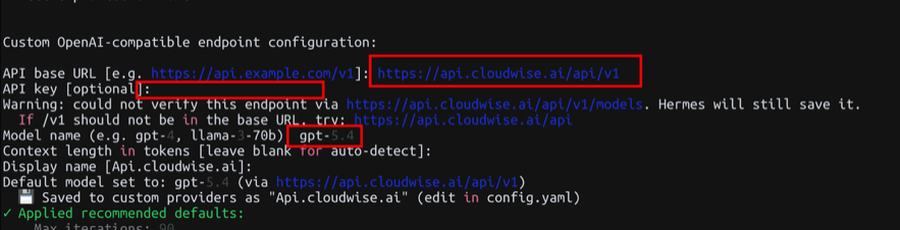
Follow the prompts and enter the following information:
API base URL: https://api.cloudwise.ai/api/v1
API key: ak_**************
Model name (e.g. gpt-4, llama-3-70b): gpt-5.4

# Other options: press Enter to use defaults
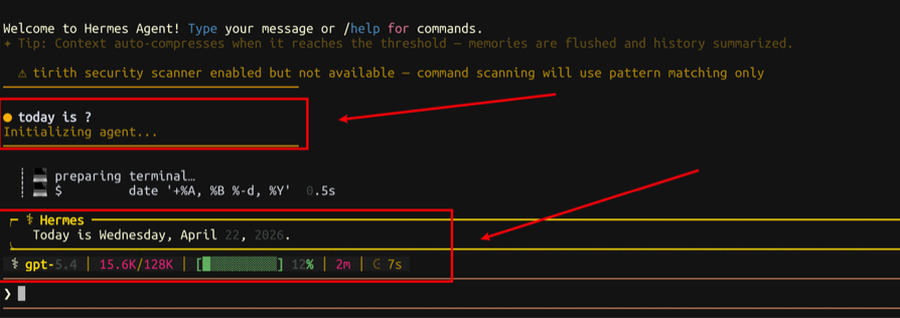
Launch Hermes and ask a question to verify the connection:
hermes
You should see the model name in the status bar (e.g., gpt-5.4 | 15.6K/128K), confirming Cloudwise MaaS is active.
Switch to Cloudwise MaaS: Claude Models
Supported Models: Full series of Claude models (Opus, Sonnet, Haiku).
Test Key: ak_f58064831857443bbfc75b0b4fb9d9c3
To switch to Claude models, use the hermes config set commands:
# Claude switching method:
hermes config set model.base_url https://api.cloudwise.ai/api
hermes config set model.default claude-opus-4-7
hermes config set model.provider anthropic
hermes config set model.api_key ak_**************
hermes config set ANTHROPIC_API_KEY ak_**************
Replace ak_************** with your actual Cloudwise API key. Note: Claude models use the /api endpoint (without /v1).
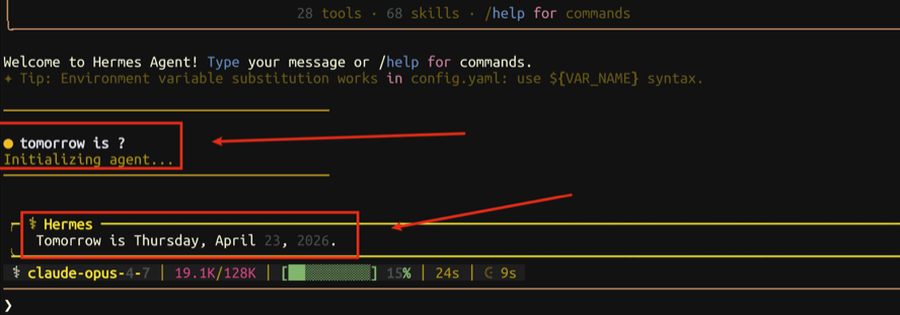
Launch Hermes and ask a question. The status bar should show the Claude model (e.g., claude-opus-4-7 | 19.1K/128K).
hermes
Supported Models
Through Cloudwise MaaS, Hermes Agent can access the following models:
OpenAI-Compatible Models
| Model | Type |
|---|---|
gpt-5.4 | GPT Latest |
gpt-5.3-chat | GPT Chat |
gpt-5.3-codex | GPT Code |
gpt-5.2 | GPT |
gpt-5.1 | GPT |
gpt-5 | GPT |
gpt-5-mini | GPT Mini |
gpt-4o | GPT Vision |
gpt-4.1 | GPT |
grok-4 | Grok Latest |
grok-4-0709 | Grok |
grok-3 | Grok |
grok-3-mini | Grok Mini |
deepseek-v3.2 | DeepSeek |
glm-5 | GLM |
glm-5.1 | GLM |
kimi-2.6 | Kimi |
doubao-seed-1-8-251228 | Doubao |
Claude Models (Anthropic)
| Model | Thinking |
|---|---|
claude-opus-4-7 | No |
claude-opus-4-7-thinking | Yes |
claude-opus-4-6 | No |
claude-opus-4-6-thinking | Yes |
claude-opus-4-5-20251101 | No |
claude-opus-4-1-20250805 | No |
claude-opus-4-1-20250805-thinking | Yes |
claude-opus-4-20250514 | No |
claude-opus-4-20250514-thinking | Yes |
claude-sonnet-4-6 | No |
claude-sonnet-4-6-thinking | Yes |
claude-sonnet-4-5-20250929 | No |
claude-sonnet-4-20250514 | No |
claude-haiku-4-5-20251001 | No |
Summary
You have now configured Hermes Agent to work with the Cloudwise MaaS platform. Here's a recap:
| Item | Value |
|---|---|
| OpenAI Endpoint | https://api.cloudwise.ai/api/v1 |
| Claude Endpoint | https://api.cloudwise.ai/api |
| Config Command | hermes model (OpenAI) / hermes config set (Claude) |
| Launch | hermes |
If you encounter any issues, verify your API key and endpoint URL. You can edit the config directly at config.yaml. Visit maas.cloudwise.ai to manage your API keys and monitor usage.